Cryptogram: Word Logic Puzzles
GismartWord
4.610.14K Reviews
- Version
- 3.8.1
- Installs
- 10.00M
- Age Rating
- Everyone
Screenshots
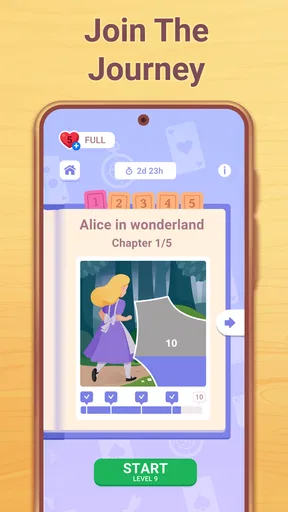
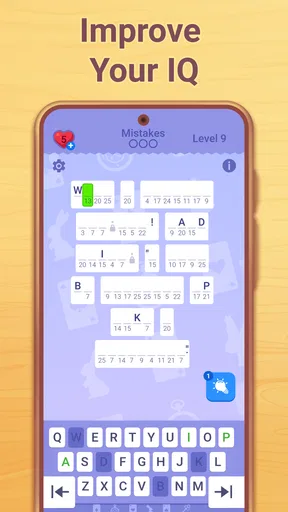
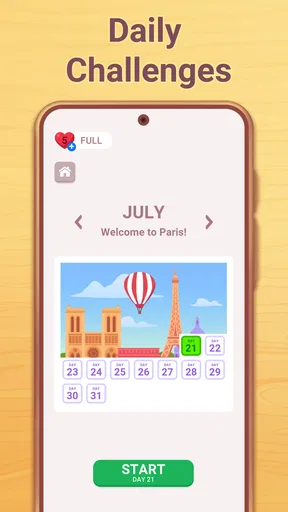
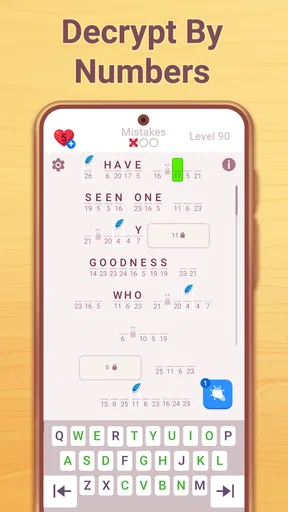
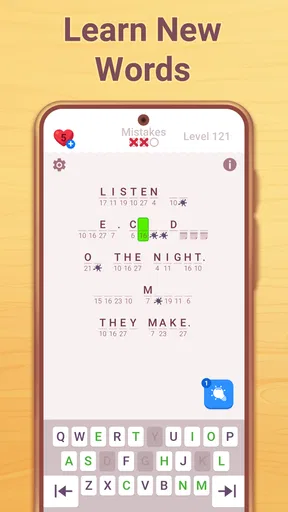
Our Review of Cryptogram: Word Logic Puzzles
 Analysis by Appyee
I reach for a word game when I want something more thoughtful than a quick reflex challenge but less involved than sitting down with a long puzzle. That is the niche Cryptogram: Word Logic Puzzles aims to fill: it turns letter patterns into a short code-breaking task, with a phrase to uncover at the end. The appeal is easy to understand, but the key question is whether this style of puzzle suits the way you like to spend a spare few minutes.
Choose the puzzle style that suits you
A cryptogram asks you to reason from clues inside the text. Repeated letters, short words, and familiar sentence patterns can all help you work out which symbols stand for which letters. That makes this a different kind of thinking from a conventional crossword, where you may rely on definitions and crossing answers, or a word-search game, where the challenge is spotting words in a grid. I find cryptograms most satisfying when I can make gradual progress rather than guess at a single answer.
That distinction matters when choosing a game. If you enjoy noticing patterns and testing a theory, this format can be absorbing. If you mainly want vocabulary quizzes, anagrams, or quick rounds with an obvious finish, another kind of word game may be a better match. The phrase at the end gives each puzzle a sense of completion, but the real work is the reasoning along the way.
A useful fit for small breaks
The strongest use case is a pause that is long enough to focus but too short to start something demanding. I can imagine opening a puzzle while waiting for a coffee, then setting it aside if the queue moves. It is also a reasonable wind-down activity when I want to engage my mind without committing to a sprawling game. The text-based format makes the central task easy to understand: look for patterns, try a letter, and see whether the phrase begins to make sense.
For a less obvious approach, I would treat each puzzle like a small deduction exercise rather than tapping letters at random. Start with repeated patterns, then use any short, common-looking words as tentative clues. If a guess makes several other parts of the phrase inconsistent, undo that line of thinking instead of doubling down. This habit helps preserve the pleasure of solving and makes hints more useful when you truly hit a wall.
Another practical choice is to stop when you are no longer making progress. A cryptogram can feel harder when you have stared at the same arrangement for too long; coming back with fresh eyes may help you notice a pattern you missed. That is a better fit for an on-and-off break than a game that expects an uninterrupted session, though players who prefer a clear timer or brisk rounds may find the pace too contemplative.
Where its approach stands out
As a word game from Gismart, it keeps its focus on decoding phrases rather than mixing many unrelated puzzle mechanics into one experience. I like that distinction: it gives the game a recognizable identity and makes it easier to decide whether its core activity is for you. Its description also points to logic puzzles, scrambled letters, and daily crossword play, so the broader word-puzzle framing may appeal to someone who likes variety across this general genre. I would still choose it primarily for the code-breaking idea, not assume that every session will feel like a crossword.
Compared with paper cryptograms, a phone game is convenient when I do not have a puzzle book to hand, and the hint option can help when I want a nudge rather than a full solution. Compared with crosswords, the trade-off is that solving depends more on letter substitution and sentence context than on a broad set of clues. Neither approach is universally better: choose this one for pattern deduction, and choose a crossword when you would rather work from definitions and crossing entries.
There is also a useful difference from open-ended word games. A hidden phrase gives a puzzle a specific destination, which can feel rewarding when the final letters fall into place. The same structure can be limiting if you want to create words, compete directly with someone, or explore a larger collection of puzzle formats in one session. I would not treat the app as a substitute for every kind of word play; its appeal is strongest when the cipher itself is the point.
What’s the Buzz About?
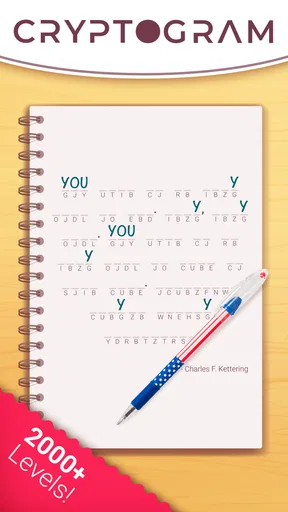
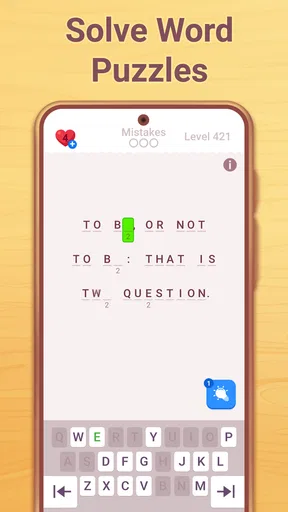
So, here’s the scoop: Cryptogram: Word Logic Puzzles is all about deciphering encrypted quotes. You’re given a puzzle where each letter is replaced by another. Your job? Crack the code and reveal the original phrase. Sounds simple, right? But trust me, it’s a delightful brain teaser that keeps you coming back for more!
Getting Started
First things first, the interface is as smooth as butter. Once you fire up the app, you’ll find a clean and intuitive layout that doesn’t overwhelm. You can dive straight into a puzzle without any fuss. For newbies, there’s a handy tutorial that guides you through the basics. It’s perfect if you’re just getting your feet wet with cryptograms.
When you first try it, I’d focus on understanding how your letter choices affect the whole phrase instead of treating every blank as a separate question. That is the central habit that makes this kind of puzzle click. The tutorial is a useful on-ramp for someone new to cryptograms, while a player who already knows substitution puzzles can move directly into solving. If you are sharing the phone with a child or a less experienced player, the Everyone age rating makes the game broadly suitable, though the best fit still depends on whether that player enjoys reading and word challenges.
Dive into the Puzzles
Now, let’s talk about the puzzles themselves. They’re crafted with a range of difficulty levels. Whether you’re a seasoned pro or a curious beginner, there’s something here for everyone. The app throws a mix of quotes from famous figures, literature, and more. It’s like a little journey through time and culture in each puzzle.
The quote format gives the solving process a second layer: you are not only testing letters, but also forming expectations about how a sentence might read. I recommend using that context carefully. A phrase that sounds familiar can tempt you into filling in a whole line from memory, but a plausible quote is not the same as a proven solution. Check that a proposed letter mapping works throughout the puzzle before you commit to it. This small discipline makes the logic more satisfying and reduces the chance of getting stuck because one confident early guess was wrong.
For beginners, easier puzzles can be a way to learn what repeated patterns look like; more practiced solvers can use the tougher ones to slow down and reason through competing possibilities. If you are looking for a broad daily routine, the game’s word-puzzle framing may be appealing, but it is still worth asking yourself whether you want to spend that time on coded phrases or on a crossword grid. The two can both be relaxing, yet they reward different habits.
Features That Shine
One of the standout features? The hint system. If you ever get stuck, and trust me, it happens, you can tap into hints to nudge you in the right direction. But use them wisely; it’s all about the challenge, after all!
I treat a hint as a way to restart my reasoning, not as a shortcut to finish every difficult line. Before using one, I would reread the phrase and check which letters I have already tested. That makes the nudge more informative: it can help you see how one clue connects to several blanks instead of simply removing the challenge. If you are playing to relax, using help when frustration sets in is perfectly reasonable; if you want to build your own solving skill, pausing first can be more rewarding.
Plus, the app doesn’t bombard you with ads, which is a breath of fresh air. You can focus on the puzzles without annoying pop-ups ruining the vibe.
The game is free to download, which makes it easy to try before deciding whether its central mechanic holds your attention. In-app purchases are available, ranging from $0.99 to $99.99 per item, so I would check any purchase prompt carefully rather than assume every part of the experience is included at no cost. That range is a meaningful consideration for families and anyone who prefers to keep mobile spending predictable. The practical approach is simple: enjoy the free entry point, and only consider spending if you understand what the particular offer provides and are comfortable with it.
Why You’ll Love It
Honestly, it’s the perfect mix of learning and fun. Each puzzle not only challenges your brain but also leaves you with a memorable quote to ponder. Whether you’re waiting for your coffee or winding down after a long day, it’s a great way to keep your mind sharp.
It is especially appealing if you like a game that can be interrupted without losing the thread of why you opened it: the immediate goal is visible, and the phrase gives you a clear reason to continue. For example, on a commute I might solve a few letters, put my phone away when my stop approaches, and return later to the same kind of deduction. That flexible rhythm is more useful to me than a game built around sustained concentration, although I would choose a paper puzzle or a longer-form game if I wanted a screen-free break.
One small strategy that makes the experience more deliberate is to keep track mentally of confirmed letters separately from guesses. When several plausible words compete, the confirmed pattern is the reliable part; the rest should remain provisional. This is particularly helpful on longer phrases, where one wrong assumption can make later clues seem impossible. It turns the puzzle into a sequence of testable decisions rather than a string of hopeful taps.
The game has an average rating of 4.5 from around 365,000 ratings, and it has been installed over 10 million times. Those figures suggest that the basic idea has broad appeal, but they cannot tell you whether you personally enjoy substitution puzzles. I would use them as a reason to give the format a fair try, not as a guarantee that every puzzle or session will suit your taste.
Room for Improvement?
While the app is pretty fantastic, nothing’s perfect, right? Some users might crave more customization options or the ability to track their progress over time. But hey, for a free app, it packs a punch!
That limitation matters most if you are motivated by long-term goals, detailed statistics, or the ability to tailor how a puzzle looks and feels. Players who want a record of improvement may prefer a word-game alternative that makes tracking central to the experience. I would also skip this one if I dislike solving from sentence context, want competitive play, or find quote puzzles too dependent on recognizing familiar phrasing. A straightforward crossword, a vocabulary challenge, or a paper cryptogram book may be a better choice in those cases.
Before switching from another word game, consider what you would actually miss. If your favorite part is the convenience of opening a quick puzzle, this game can offer a different mental rhythm without requiring a new kind of commitment. If you rely on a particular alternative for progress records, customizable play, or a variety of mechanics, changing over may feel like a step sideways rather than an upgrade. I would try a few sessions first and judge the core code-breaking loop on its own merits.
Cryptogram: Word Logic Puzzles is currently at version 3.0.0 and requires Android 10 or later. It is made by Gismart, and its age rating is Everyone. Those details make it straightforward to check basic suitability before installing: Android users should confirm their device meets the minimum system requirement, while iOS readers should check compatibility in their relevant app store. The game is free to start, but the in-app purchase range is worth keeping in mind if you share a device or want to avoid unexpected spending.
In a nutshell, Cryptogram: Word Logic Puzzles is a delightful escape for anyone who loves words and puzzles. It’s like having a mini crossword in your pocket, ready to entertain and challenge you whenever you need a break. So, if you’re up for a mental workout, give it a whirl!
My recommendation is to try it if you enjoy language puzzles that reward patience and pattern recognition, especially when you want a compact activity for spare moments. I would choose a crossword when I want clue-by-clue variety, or another word game when I want competition, customization, or a broader mix of tasks. For me, the deciding factor is simple: if deciphering a phrase sounds fun even before I know what it says, this is an easy game to sample; if that process sounds like work, the alternatives will probably be a better use of your break.
Privacy and Permissions
See what permissions an app requests and how it handles your data.
- Wi-Fi connection information
- view Wi-Fi connections
- Other
- view network connections, full network access, control vibration, prevent device from sleeping, Google Play license check
Verdict
Strengths of Cryptogram: Word Logic Puzzles
- Engaging puzzles enhance vocabulary skills.
- User-friendly interface for easy navigation.
- Regular updates with new puzzle challenges.
- No internet connection required for gameplay.
- Hints available to assist with difficult levels.
Limitations of Cryptogram: Word Logic Puzzles
- Limited free hints can slow progress.
- In-app ads might interrupt gameplay.
- Some puzzles repeat over time.
- Higher levels can be too challenging.
- No multiplayer or competitive mode.
Other Releases by Gismart
View All
Piano - Music Keyboard & Tiles
Music4.1

Real Guitar - Music Band Game
Music3.1

Drum Pads - Beat Maker Go
Music & Audio3.0

VIP Guard
Arcade4.7
Similar Picks in This Category
View All
Word Search - Word Puzzle Game
Bluetile4.8

Word Search Quest - Puzzles
Blackout Lab4.8

CodyCross: Crossword Puzzles
Fanatee, Inc.4.7

Words of Wonders: Crossword
Fugo Games4.9

Wordscapes: Word puzzle game
PeopleFun4.7

Word Search Explorer
PlaySimple Games4.9
Frequently Asked Questions
What is Cryptogram: Word Logic Puzzles and how does it work?
Cryptogram: Word Logic Puzzles is an engaging mobile game that challenges players to decode encrypted messages using logic and pattern recognition. Each puzzle consists of a series of scrambled letters that represent a meaningful phrase or sentence. Players must deduce the correct letters through clues and logical thinking to solve the puzzle.
Is Cryptogram: Word Logic Puzzles suitable for all ages?
Yes, Cryptogram: Word Logic Puzzles is designed for a wide audience, including both adults and children. The game promotes problem-solving skills and enhances vocabulary. However, younger players might require some guidance to understand the mechanics and strategies involved in decoding the puzzles.
Are there any in-app purchases or ads in Cryptogram: Word Logic Puzzles?
Cryptogram: Word Logic Puzzles is free to download and play. While it offers a complete experience without spending money, the app may contain ads to support its free version. Users also have the option to make in-app purchases to remove ads or access additional features and puzzle packs.
Does Cryptogram: Word Logic Puzzles require an internet connection?
No, Cryptogram: Word Logic Puzzles can be played offline, making it perfect for travel or areas with limited connectivity. However, certain features, such as accessing the latest updates or purchasing new puzzle packs, may require an internet connection.
What are the main benefits of playing Cryptogram: Word Logic Puzzles?
Playing Cryptogram: Word Logic Puzzles can improve mental agility, enhance vocabulary, and boost problem-solving skills. The game provides a fun and challenging way to keep the mind active. Additionally, it offers a satisfying sense of achievement when players successfully decode complex puzzles.
Play our best games!


